Qwen-Image 2.1 をインストールする - SD Web UI Forge Neoを利用
質問: SD WebUI Forge Neo で Qwen Image 2.1を使いたい
SD WebUI Forge Neo で Qwen Image 2.1が利用できると聞きました。どのように利用するのでしょうか?
Qwen-Image 2.1の導入
Qwen-Image 2.1をSD WebUI Forge Neoで利用できるようにします。
事前準備: SD WebUI Forge Neoの導入
SD WebUI Forge Neo を導入します。手順はこちらの記事を参照してください。
すでに導入されている場合は、Gitからプルをして最新バージョンにします。
モデルのダウンロード
Qwen-Image 2.1 モデル
以下の HuggingFaceのHubから、Qwen-Image 2.1のモデル qwen_image_2.1_bf16.safetensors または qwen_image_2.1_int8_convrot.safetensors をダウンロードします。
今回は int8 convrot モデルを利用します。
ダウンロードしたモデルを次のディレクトリに配置します。
(SD WebUI Forge Neoの配置ディレクトリ)\models\diffusion_models\qwen-image\
メモ
モデルの配置位置は通常は (SD WebUI Forge Neoの配置ディレクトリ)\models\diffusion_models ですが、
他のモデルと混同しないよう qwen-image でディレクトリ分けしています。
テキストエンコーダー
以下の HuggingFaceのHubから、Qwen-Imageのテキストエンコーダー qwen3vl_8b_bf16.safetensors または qwen3vl_8b_int8_convrot.safetensorsをダウンロードします。
今回は int8 convrot モデルを利用します。
ダウンロードしたファイルを以下のディレクトリに配置します。
(SD WebUI Forge Neoの配置ディレクトリ)\models\text_encoder
VAE
以下の HuggingFaceのHubから、Qwen-ImageのVAE qwen_image_2.1_vae_bf16.safetensors をダウンロードします。
ダウンロードしたモデルを次のディレクトリに配置します。
(SD WebUI Forge Neoの配置ディレクトリ)\models\VAE
WebUIの設定
SD WebUI Forge Neoを起動します。ウィンドウ上部の[UI Preset]をクリックしてドロップダウンリストから "qwen21" を選択します。
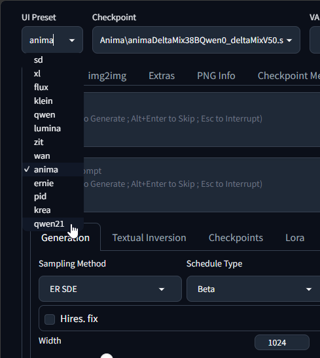
[Checkpoint]のドロップダウンリストボックスをクリックし、Krea 2 のモデルを選択します。
今回は "Qwen-Image\qwen_image_2.1_int8_convrot.safetensors" を選択します。
[VAE / Text Encoder]は"qwen3vl_8b_int8_convrot.safetensors" "qwen_image_2.1_vae_bf16.safetensors" を選択します。

画像生成: txt2img
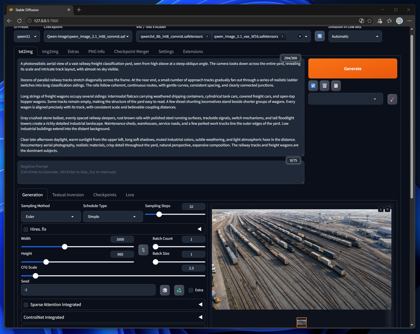
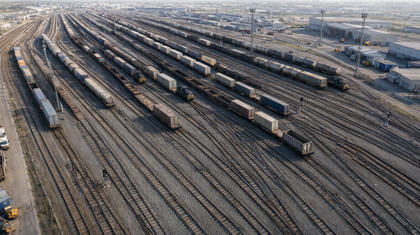
プロンプトを入力し、[Generate]ボタンをクリックします。画像が生成され、生成画像が表示できました。
今回設定したプロンプトは以下です。
Prompt
Prompt:
A photorealistic aerial view of a vast railway freight classification yard, seen from high above at a steep oblique angle. The camera looks down across the entire yard, revealing its scale and intricate track layout, with almost no sky visible.
Dozens of parallel railway tracks stretch diagonally across the frame. At the near end, a small number of approach tracks gradually fan out through a series of realistic ladder switches into long classification sidings. The rails follow coherent, continuous routes, with gentle curves, consistent spacing, and clearly connected junctions.
Long strings of freight wagons occupy several sidings: intermodal flatcars carrying weathered shipping containers, cylindrical tank cars, covered freight cars, and open-top hopper wagons. Some tracks remain empty, making the structure of the yard easy to read. A few diesel shunting locomotives stand beside shorter groups of wagons. Every wagon is aligned precisely with its track, with consistent scale and believable coupling distances.
Gray crushed-stone ballast, evenly spaced railway sleepers, rust-brown rails with polished steel running surfaces, trackside signals, switch mechanisms, and tall floodlight towers create a richly detailed industrial landscape. Maintenance sheds, warehouses, service roads, and a few parked work trucks line the outer edges of the yard. Low industrial buildings extend into the distant background.
Clear late-afternoon daylight, warm sunlight from the upper left, long soft shadows, muted industrial colors, subtle weathering, and light atmospheric haze in the distance. Documentary aerial photography, realistic materials, crisp detail throughout the yard, natural perspective, expansive composition. The railway tracks and freight wagons are the dominant subjects.
プロンプトを入力し、[Generate]ボタンをクリックします。画像が生成され、生成画像が表示できました。
画像生成: 参照画像を利用
参照画像を利用した画像生成を実行してみます。
設定の確認
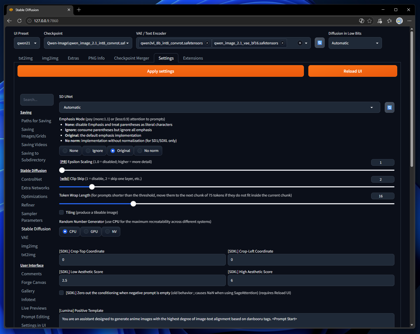
初めに、SD Web UI Forge Neoの設定を確認します。[Settings]タブをクリックし、設定画面を表示します。
左側のメニューの[Stable Diffusion]の項目をクリックします。下図の画面が表示されます。
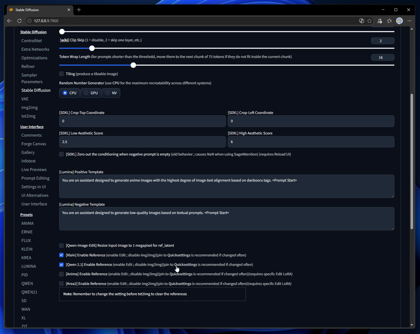
画面を下にスクロールし、"[Qwen 2.1] Enable Reference (enable Edit ; disable img2img)(pin to Quicksettings is recommended if changed often)" のチェックボックスに
チェックがついていることを確認します。
参照画像の追加
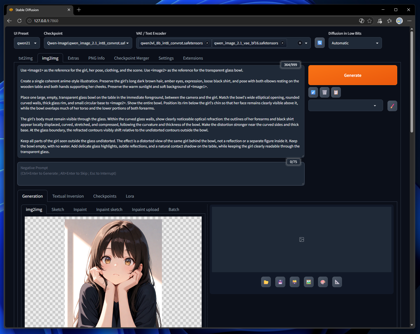
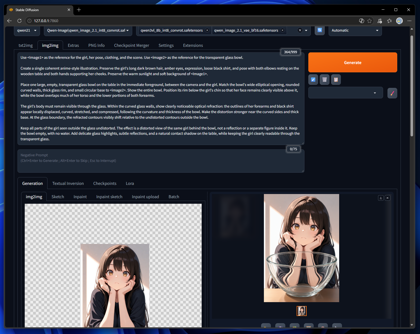
[img2img]のタブをクリックして選択します、下図の画面が表示されます。
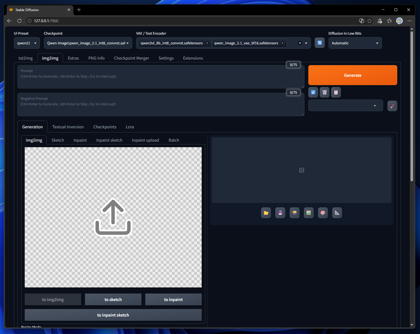
img2imgの画像部分に1枚目の画像をドラッグアンドドロップまたは、ファイルを開いて読み込みます。
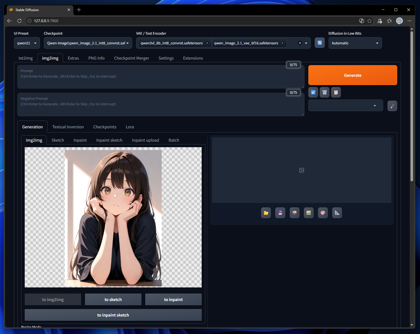
2枚目以降の参照画像は、下にスクロールし[ImageStitch Integrated]の項目をチェックしてパネルをクリックして展開します。
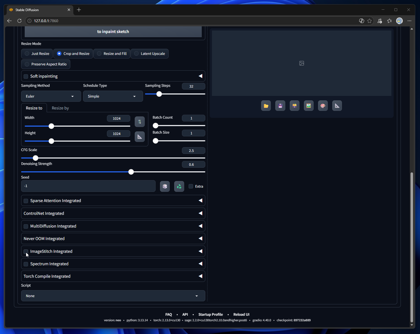
パネルを開くと下図の状態になります。
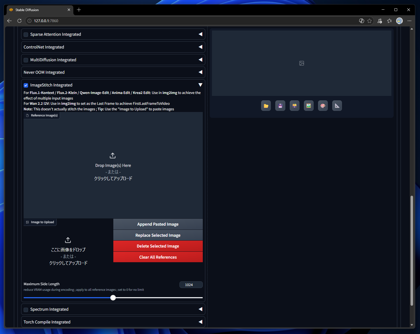
2枚目の参照画像をパネルの左下部分にドラッグアンドドロップまたは、ファイルを開いて読み込みます。読み込まれると下図の状態になります。
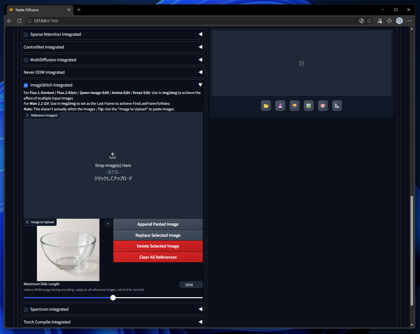
[Append Pasted Image]のボタンをクリックします。読み込まれた画像が上部に移動して参照画像に追加されます。
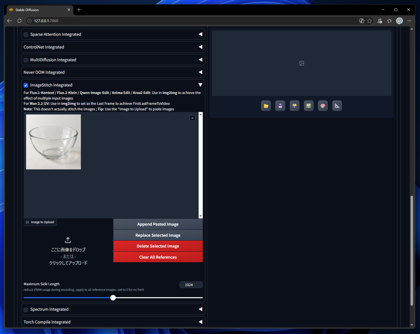
同様の手順で複数の参照画像を追加できます。
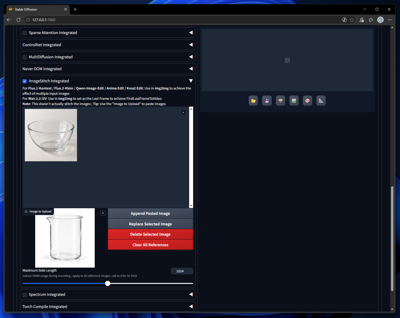
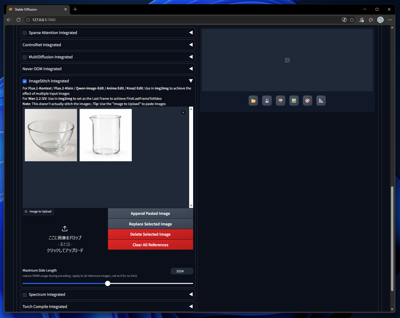
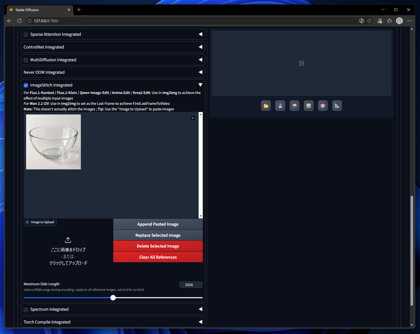
また、上部の画像一覧で削除したい画像をクリックして選択した状態で、[Delete Selected Image]ボタンをクリックすると参照画像を削除できます。
画像の生成
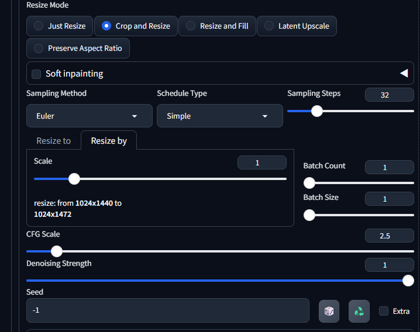
画像を生成します。[Denoising Strength] の値を "1" に設定します。値が低いと描画がうまく反映されません。
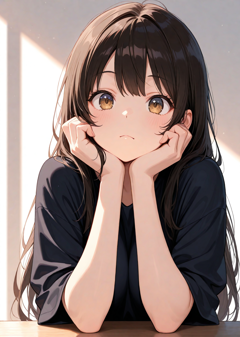
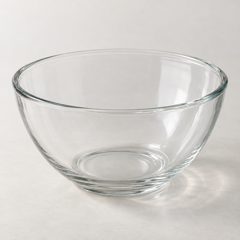
参照画像は1枚目の画像が <image1> 2枚目以降の参照画像が <image2> <image3> の画像スロットになりますので、プロンプトにおいて、こちらの表記で参照できます。
以下のプロンプトで画像生成します。
Prompt
Prompt:
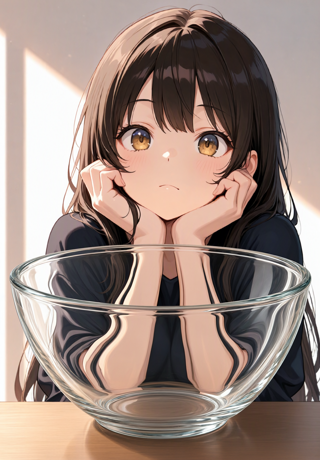
Use <Image1> as the reference for the girl, her pose, clothing, and the scene. Use <image2> as the reference for the transparent glass bowl.
Create a single coherent anime-style illustration. Preserve the girl's long dark brown hair, amber eyes, expression, loose black shirt, and pose with both elbows resting on the wooden table and both hands supporting her cheeks. Preserve the warm sunlight and soft background of <Image1>.
Place one large, empty, transparent glass bowl on the table in the immediate foreground, between the camera and the girl. Match the bowl's wide elliptical opening, rounded curved walls, thick glass rim, and small circular base to <image2>. Show the entire bowl. Position its rim below the girl's chin so that her face remains clearly visible above it, while the bowl overlaps much of her torso and the lower portions of both forearms.
The girl's body must remain visible through the glass. Within the curved glass walls, show clearly noticeable optical refraction: the outlines of her forearms and black shirt appear locally displaced, curved, stretched, and compressed, following the curvature and thickness of the bowl. Make the distortion stronger near the curved sides and thick base. At the glass boundary, the refracted contours visibly shift relative to the undistorted contours outside the bowl.
Keep all parts of the girl seen outside the glass undistorted. The effect is a distorted view of the same girl behind the bowl, not a reflection or a separate figure inside it. Keep the bowl empty, with no water. Add delicate glass highlights, subtle reflections, and a natural contact shadow on the table, while keeping the girl clearly readable through the transparent glass.
参照画像は下図です。
[Generate]ボタンをクリックして画像生成します。参照画像を反映した画像が生成できます。
著者
iPentecのメインデザイナー
イタリア好き。Webページ、Webクリエイティブのデザインを担当。PhotoshopやIllustratorの作業もする。
最近は生成AIの画像生成の沼に沈んでいる。