MiniMax H3 のTurbo LoRA を利用して動画を生成する

カボナー
質問: MiniMax H3 のTurbo LoRA
MiniMax H3でTurbo LoRAを利用すると、さらに生成時間を速くできると聞きました。 どのようにセットアップすればよいでしょうか?また、画質の劣化なども気になるのですが、どんな感じですか?

MiniMax H3 のTurbo LoRA の導入手順を紹介します。

Turbo LoRA のダウンロード

MiniMax Turbo LoRAは複数の種類が出ていますが、今回は、以下のTurbo LoRAを利用します。


以下のURLから、"minimax_h3_fl2v_lightx2v_turbo_4step_v0.1_comfy.safetensors" をダウンロードします。


ダウンロードしたファイルを以下のディレクトリに配置します。

(ConmfyUIの配置ディレクトリ\ComfyUI\models\loras\minimax-h3
別のTurbo LoRA
こちらのLoRAもよく利用されています。
https://huggingface.co/drbaph/MiniMax-H3-Turbo-Lora-ComfyUI/tree/main

ワークフロー

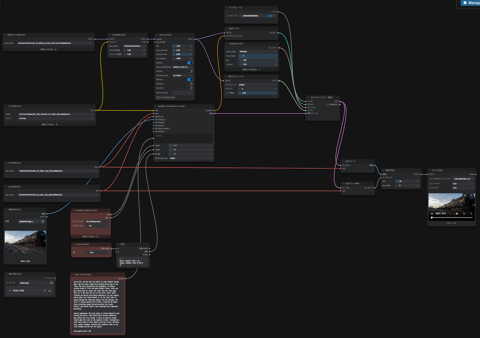
ワークフローは下図です。
MiniMax H3 のTurbo LoRA を利用して動画を生成する:画像1

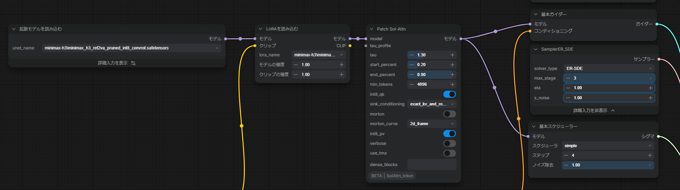
[LoRAを読み込む]ノードを配置して、[拡散モデルを読み込む]ノードの後ろに接続します。"lora_name" には、先にダウンロードして配置した、 "minimax_h3_fl2v_lightx2v_turbo_4step_v0.1_comfy.safetensors" を指定します。

MiniMax H3 のTurbo LoRA を利用して動画を生成する:画像2

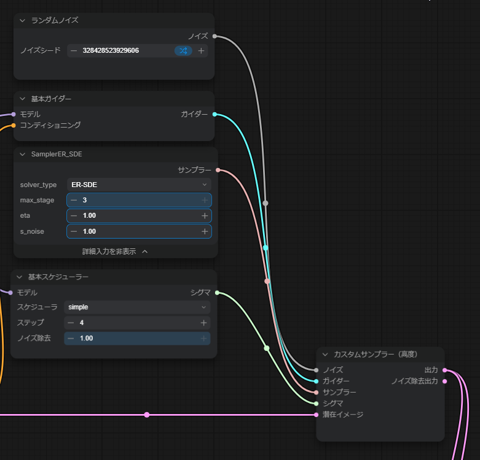
また、Turbo LoRA利用時には、スケジューラーは ER-SDE が推奨されていますので、[SamplerER_SDE]ノードを配置して、[Kサンプラー選択]ノードと置き換えます。

MiniMax H3 のTurbo LoRA を利用して動画を生成する:画像3

生成例

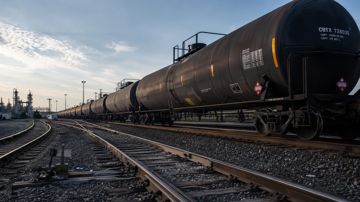
Turbo LoRAを利用して、以下のプロンプトと下図の画像で動画を生成します。

MiniMax H3 のTurbo LoRA を利用して動画を生成する:画像4

プロンプト
For the target video, at 0.00 seconds into the target video, <Picture 1> (from [Shot 1]) is fully referenced.

integrated_multimodal_description: [Shot 1] Live-action, cinematic, a wide low-angle shot frames the long line of black railroad tank cars shown in <Picture 1>, preserving the "CBTX 728035" markings, the orange hazard placards reading "1267", the curving rail tracks in the foreground, the distant refinery structures on the left, and the early-morning sky with scattered clouds. The camera holds a static shot on the completely stationary train; for the first half second, every tank car stands perfectly still on the rails with no movement at all. Almost immediately, a low metallic jolt travels along the train as the couplers take up slack one by one, and the tank cars begin to creep forward, moving away from the viewer toward the vanishing point deep in the frame. The train accelerates very gradually, its wheels turning slowly at first and then slightly faster, while one more black tank car enters the frame from the right edge; this car is the very last car of the train, with a small flashing red end-of-train device mounted on its rear coupler, and no other cars follow behind it. As the final tank car passes through the frame and recedes into the distance, the rails it vacates become fully visible, revealing the empty track stretching toward the horizon while the tracks, ballast, and switch stand in the foreground stay completely motionless.

overall_soundscape: The scene opens in a brief moment of near silence with only a light breeze and a distant industrial hum. Within the first second, a series of metallic clanks ripples down the train as the couplers stretch, followed by a slow, heavy groan of steel wheels starting to turn, building into a gentle rhythmic clacking that gradually fades as the train recedes and the last car passes.


non_diegetic_music: N/A
プロンプト(日本語訳)
対象動画について、動画の0.00秒時点で、<Picture 1>([Shot 1]由来)が完全に参照されます。

integrated_multimodal_description: [Shot 1] 実写、シネマティック。ワイドなローアングルショットで、<Picture 1>に示された黒いタンク貨車の長い車列を捉える。「CBTX 728035」の車体表記、「1267」と書かれたオレンジ色の危険物標識、手前でカーブする線路、左奥の製油所の構造物、雲が散らばる早朝の空をそのまま維持する。カメラは完全に停止した列車を固定ショットで捉え続ける。最初の0.5秒間、すべてのタンク車はレール上で完全に静止しており、一切の動きがない。その直後、連結器の遊びが1両ずつ順に伸びていくのに合わせて、低い金属的な衝撃が列車全体を伝わり、タンク車はゆっくりと前進を始め、画面の奥の消失点に向かって視点から遠ざかっていく。列車はごく緩やかに加速し、車輪は最初はゆっくりと、次第にわずかに速く回転していく。その間に、もう1両の黒いタンク車が画面右端からフレームに入ってくる。この車両が列車の最後尾であり、後部連結器には点滅する小さな赤い列車末尾標識(EOT装置)が取り付けられていて、その後ろに続く車両は存在しない。最後のタンク車がフレームを通過して遠ざかっていくと、その車両が去った後のレールが完全に見えるようになり、地平線に向かって延びる無人の線路が現れる。その間も、手前の線路、バラスト、転轍機標識は完全に静止したままである。

overall_soundscape: シーンは、かすかなそよ風と遠くの工業地帯の低い音だけの、ほぼ無音の短い瞬間から始まる。最初の1秒以内に、連結器が伸びる金属的なガチャンという音が列車に沿って連続して響き、続いて鋼鉄の車輪が回転し始める低く重いきしみ音が起こり、それが穏やかなリズミカルな走行音(ジョイント音)へと高まっていき、列車が遠ざかり最後尾が通過するにつれて徐々に消えていく。

non_diegetic_music: N/A(非ダイエジェティック音楽なし)


プロンプトの作成は以下の指示でClaudeで作成しています。

プロンプト生成指示 (Claude)
添付ファイルのMiniMax H3のプロンプトガイドを基に動画を生成するプロンプトを作成してください。 表現するシーンは次の通りです。添付の画像を最初のフレームとします。
タンクの貨車が画面の奥方向に向かって進んでいくシーンです。カメラは固定したままとします。

いきなり発車せずに、止まっている状態からゆっくり発進する感じにしたいです。動画開始から0.5秒程度静止していてほしいです。


生成結果の動画は以下です。Turbo LoRAありの場合となしの場合で、3回ずつ生成しています。


Turbo LoRA ありの場合は、やや列車の動きが速めな印象があります。また、動きのバリエーションが3回ともほとんど同じです。 LoRAなしの場合は、ゆったりとした動きの印象になります。また、動きのバリエーションが3回とも微妙に異なり、違いがあります。

AuthorPortraitAlt
著者
iPentecのメインデザイナー
イタリア好き。Webページ、Webクリエイティブのデザインを担当。PhotoshopやIllustratorの作業もする。 最近は生成AIの画像生成の沼に沈んでいる。
作成日: 2026-08-08