IISでASP.NET Core アプリにアクセスすると "Application '(パス)' failed to start. Exception message: Executable was not found at '(パス)\%LAUNCHER_PATH%.exe'"エラーが発生する
質問: ASP.NETアプリでエラー
ASP.NETアプリをデプロイして実行したところ、以下のエラーが発生しました。直前までは発生していなかったので、原因がわからないです。
Application '(パス)' failed to start. Exception message: Executable was not found at '(パス)\%LAUNCHER_PATH%.exe'
現象の確認
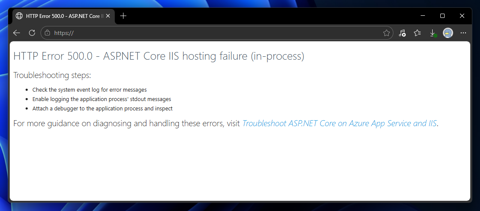
IISでASP.NET Core アプリをホストして実行すると、アプリが起動できず、イベントビューアーに以下のエラーが記録されます。
エラーメッセージ
HTTP Error 500.0 - ASP.NET Core IIS hosting failure (in-process)
Troubleshooting steps:
- Check the system event log for error messages
- Enable logging the application process' stdout messages
- Attach a debugger to the application process and inspect
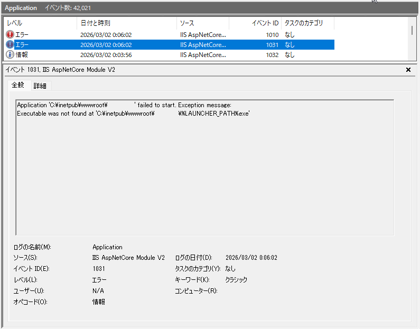
イベントビューアーを確認するとIISのエラーが2つ並んでいます。

一つ目のエラーは以下です。
エラーメッセージ
Application '(パス)' failed to start. Exception message:
Executable was not found at '(パス)\%LAUNCHER_PATH%.exe'
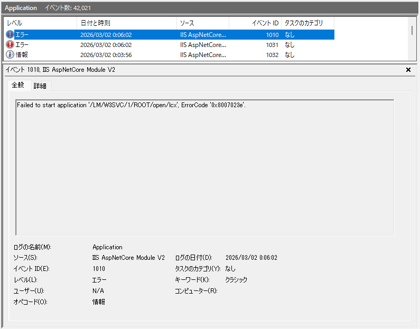
もう一つのエラーは以下です。
エラーメッセージ
Failed to start application '/LM/W3SVC/1/ROOT/(パス)', ErrorCode '0x8007023e'.
原因
%LAUNCHER_PATH% の置換に失敗しています。置換に失敗する原因として、<aspNetCore> タグの階層が変化したことが考えられます。
<?xml version="1.0" encoding="utf-8"?>
<configuration>
  <location path="Activation" inheritInChildApplications="false">
    <system.webServer>
      <handlers>
        <!-- 中略 -->
      </handlers>
    </system.webServer>
  </location>
  <system.webServer>
    <handlers>
      <add name="aspNetCore" path="*" verb="*" modules="AspNetCoreModuleV2" resourceType="Unspecified" />
    </handlers>
    <aspNetCore processPath="%LAUNCHER_PATH%" arguments="%LAUNCHER_ARGS%" stdoutLogEnabled="false" stdoutLogFile=".\logs\stdout" hostingModel="inprocess" />
  </system.webServer>
</configuration>
<?xml version="1.0" encoding="utf-8"?>
<configuration>
  <location path="Dir01" inheritInChildApplications="false">
    <system.webServer>
      <handlers>
        <!-- 中略 -->
      </handlers>
    </system.webServer>
  </location>
  <location path="." inheritInChildApplications="false">
    <system.webServer>
      <handlers>
        <add name="aspNetCore" path="*" verb="*" modules="AspNetCoreModuleV2" resourceType="Unspecified" />
      </handlers>
      <aspNetCore processPath="%LAUNCHER_PATH%" arguments="%LAUNCHER_ARGS%" stdoutLogEnabled="false" stdoutLogFile=".\logs\stdout" hostingModel="inprocess" />
    </system.webServer>
  </location>
</configuration>
エラーにならないWeb.Config は aspNetCore タグは、configurationタグ内のsystem.webServer タグ内に記述されていますが、
エラーになる場合は configurationタグ内の location タグ内の system.webServer タグ内に記述されており、階層が違っているため、%LAUNCHER_PATH% の置換ができていない可能性が高いです。
対処法
%LAUNCHER_ARGS% を使わずにWeb.Configを記述します。
<?xml version="1.0" encoding="utf-8"?>
<configuration>
  <location path="Dir01" inheritInChildApplications="false">
    <system.webServer>
      <handlers>
        <!-- 中略 -->
      </handlers>
    </system.webServer>
  </location>
  <location path="." inheritInChildApplications="false">
    <system.webServer>
      <handlers>
        <add name="aspNetCore" path="*" verb="*" modules="AspNetCoreModuleV2" resourceType="Unspecified" />
      </handlers>
      <aspNetCore processPath="dotnet" arguments=".\(ASP.NET CoreのDLL).dll" stdoutLogEnabled="false" stdoutLogFile=".\logs\stdout" hostingModel="inprocess" />
    </system.webServer>
  </location>
</configuration>
著者
iPentecのメインプログラマー
C#, ASP.NET の開発がメイン、少し前まではDelphiを愛用