Cacti をバージョンアップすると、「ERROR: Your Cacti database login account does not have access to the MySQL TimeZone database.」 エラーが発生しログインできない状態になる
Cacti をバージョンアップすると、「ERROR: Your Cacti database login account does not have access to the MySQL TimeZone database.」 エラーが発生する現象について紹介します。
現象
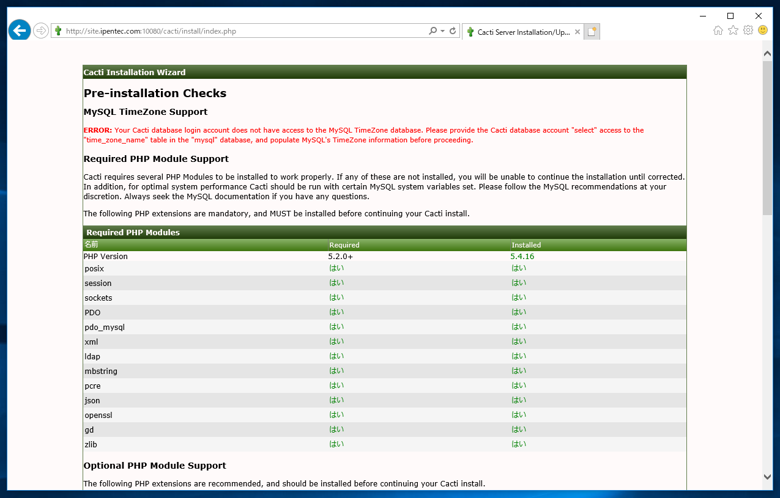
Cacti をバージョンアップすると下記のエラーが発生することがあります。
Pre-installation Checks
MySQL TimeZone Support
ERROR: Your Cacti database login account does not have access to the MySQL TimeZone database. Please provide the Cacti database account "select" access to the "time_zone_name" table in the "mysql" database, and populate MySQL's TimeZone information before proceeding.
Required PHP Module Support
Cacti requires several PHP Modules to be installed to work properly. If any of these are not installed, you will be unable to continue the installation until corrected. In addition, for optimal system performance Cacti should be run with certain MySQL system variables set. Please follow the MySQL recommendations at your discretion. Always seek the MySQL documentation if you have any questions.
The following PHP extensions are mandatory, and MUST be installed before continuing your Cacti install.
原因
MySQL, MariaDB のタイムゾーンに関する設定がされていない可能性があります。
対処法
データベースにタイムゾーンの設定をします。設定手順の詳細は、こちらの記事を参照してください。
上記のタイムゾーンの設定後、cactiuser のアカウントが TimeZoneテーブルにアクセスできるよう下記のコマンドを実行します。
grant select on mysql.time_zone_name to 'cactiuser'@'localhost'
identified by '(cactiuser のパスワード)';
以上で設定は完了です。
著者
iPentecのプログラマー、最近はAIの積極的な活用にも取り組み中。
とっても恥ずかしがり。