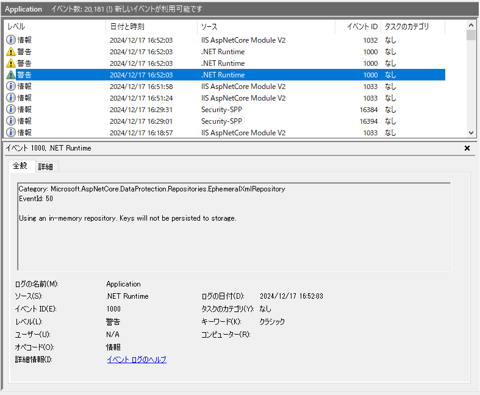
Category: Microsoft.AspNetCore.DataProtection.Repositories.EphemeralXmlRepository
EventId: 50
Using an in-memory repository. Keys will not be persisted to storage.

ASP.NET Core で DataProction に関する警告が発生する現象について紹介します。
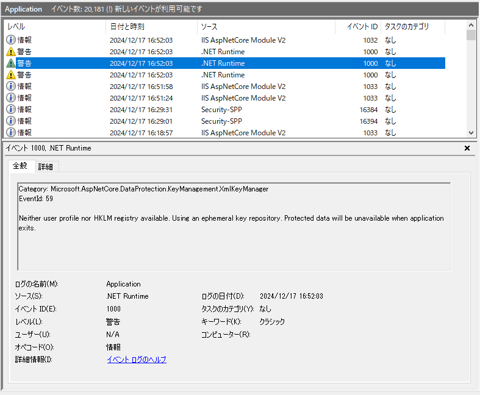
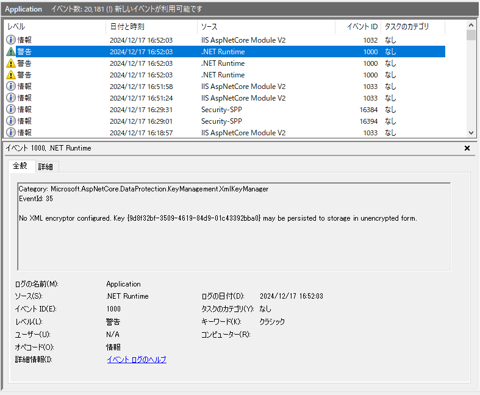
ASP.NET Core で以下の警告が発生します。
ASP.NET Core の Data Protection が動作する際にデータ保護用のキーがメモリ上に保存されるため、エフェメラル・リポジトリを使用しており、揮発する可能性がある警告です。
また、3つ目の警告はData Protection Keyが暗号化されていない旨の警告となります。
Data Protection Keyをストレージに保存します。Program.csのWebApplicationBuilderオブジェクトのAddDataProtection()メソッドを呼び出して、
Data Protection Keyに関する設定をします。
以下のコードを記述します。
  builder.Services.AddDataProtection()
    .PersistKeysToFileSystem(new DirectoryInfo(@"(キーファイルの保存先ディレクトリ)"))
    .SetApplicationName("(アプリケーション名)");
using System;
using System.Collections.Generic;
using System.IO;
using System.Linq;
using System.Threading.Tasks;
using Microsoft.AspNetCore.Builder;
using Microsoft.AspNetCore.DataProtection;
using Microsoft.AspNetCore.Hosting;
using Microsoft.Extensions.Configuration;
using Microsoft.Extensions.DependencyInjection;
using Microsoft.Extensions.Hosting;
using Microsoft.Extensions.Logging;

namespace iPentecSampleApp
{
  public class Program
  {
    public static void Main(string[] args)
    {
      var builder = WebApplication.CreateBuilder(args);

      // AddDataProtection の設定
      builder.Services.AddDataProtection()
        .PersistKeysToFileSystem(new DirectoryInfo(@"C:\DataProtectionKeys"))
        .SetApplicationName("MyApp");

      builder.Services.AddRazorPages();
      var app = builder.Build();

      if (app.Environment.IsDevelopment()) {
        app.UseDeveloperExceptionPage();
      }

      app.UseStaticFiles();
      app.MapRazorPages();
      app.Run();

    }
  }
}
DataProtection Keyを暗号化する場合には、AddDataProtection() 呼び出し時に暗号化をします。
暗号化にはいくつかの方法がありますが、今回は、Windows DPAPI を利用するコードを紹介します。
先のコードに.ProtectKeysWithDpapi() が追記されています。
以下のコードを記述します。
  builder.Services.AddDataProtection()
    .ProtectKeysWithDpapi()
    .PersistKeysToFileSystem(new DirectoryInfo(@"(キーファイルの保存先ディレクトリ)"))
    .SetApplicationName("(アプリケーション名)");
using System;
using System.Collections.Generic;
using System.IO;
using System.Linq;
using System.Threading.Tasks;
using Microsoft.AspNetCore.Builder;
using Microsoft.AspNetCore.DataProtection;
using Microsoft.AspNetCore.Hosting;
using Microsoft.Extensions.Configuration;
using Microsoft.Extensions.DependencyInjection;
using Microsoft.Extensions.Hosting;
using Microsoft.Extensions.Logging;

namespace iPentecSampleApp
{
  public class Program
  {
    public static void Main(string[] args)
    {
      var builder = WebApplication.CreateBuilder(args);

      // AddDataProtection の設定
      builder.Services.AddDataProtection()
        .ProtectKeysWithDpapi()
        .PersistKeysToFileSystem(new DirectoryInfo(@"C:\DataProtectionKeys"))
        .SetApplicationName("MyApp");

      builder.Services.AddRazorPages();
      var app = builder.Build();

      if (app.Environment.IsDevelopment()) {
        app.UseDeveloperExceptionPage();
      }

      app.UseStaticFiles();
      app.MapRazorPages();
      app.Run();

    }
  }
}
.ProtectKeysWithDpapi メソッドのパラメーターにtrue を設定すると、Data Protection の保護がマシン単位での保護になります。
マシン単位での保護にすることで、アプリケーションプールの実行ユーザーが変化した場合でもキーの複合に失敗しにくくなります。
public static void Main(string[] args)
{
  var builder = WebApplication.CreateBuilder(args);

  // AddDataProtection の設定
  builder.Services.AddDataProtection()
    .ProtectKeysWithDpapi(protectToLocalMachine: true)
    .PersistKeysToFileSystem(new DirectoryInfo(@"C:\DataProtectionKeys"))
    .SetApplicationName("MyApp");

  builder.Services.AddRazorPages();
  var app = builder.Build();

  if (app.Environment.IsDevelopment()) {
    app.UseDeveloperExceptionPage();
  }

  app.UseStaticFiles();
  app.MapRazorPages();
  app.Run();

}
trueのみでも良いです。
  builder.Services.AddDataProtection()
    .ProtectKeysWithDpapi(true)
    .PersistKeysToFileSystem(new DirectoryInfo(@"C:\DataProtectionKeys"))
    .SetApplicationName("MyApp");
Data Protection Keyをストレージに保存しても、エラーが出続ける場合はエラーを記録しない設定を追加します。
builder.Services.AddDataProtection().UseEphemeralDataProtectionProvider(); を記述して揮発的キーの設定にして、
Data Protection を無効化する対処法もあります。ログインが無くCookieを利用してセッション管理しないWebアプリケーションであれば、
UseEphemeralDataProtectionProviderによる影響は少ないですが、サーバー再起動でCookieがリセットされることなどから、本番環境での利用は推奨さ入れていません。
AddDataProtectionの設定に加えてログの記録設定を追加します。
  // AddDataProtection の追加
  builder.Services.AddDataProtection()
    .ProtectKeysWithDpapi()
    .PersistKeysToFileSystem(new DirectoryInfo(@"C:\DataProtectionKeys"))
    .SetApplicationName("iPentecDocument");

    builder.Logging.AddFilter("Microsoft.AspNetCore.DataProtection.KeyManagement.XmlKeyManager", LogLevel.Critical);       //追加
    builder.Logging.AddFilter("Microsoft.AspNetCore.DataProtection.XmlEncryption.DpapiXmlDecryptor", LogLevel.Critical);   //追加
    builder.Logging.AddFilter("Microsoft.AspNetCore.DataProtection.KeyManagement.DefaultKeyResolver", LogLevel.Critical);  //追加