参照画像のキャラクターにラフスケッチのポーズをとらせる - P-H3-Image の利用

カボナー
質問: ポーズをラフスケッチで指定したい
P-H3-Image を利用すると、ラフスケッチで参照画像のキャラクターのポーズを指定できると聞きました。どのように設定すればよいのでしょうか?


P-H3-Image を利用して参照画像のキャラクターにラフスケッチのポーズをとらせる手順を紹介します。

事前準備

P-H3-Imageの導入

こちらの記事を参照してP-H3-Imageを導入します。

ワークフロー

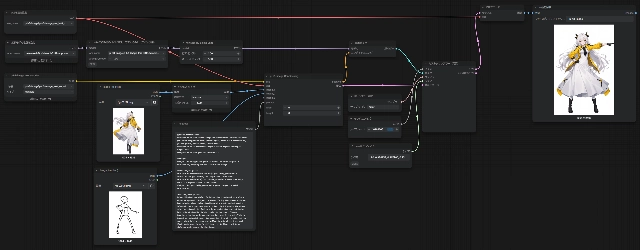
Editのワークフローを利用します。今回はupsamplerありのワークフローを利用します。(以下のワークフロー)

実施例

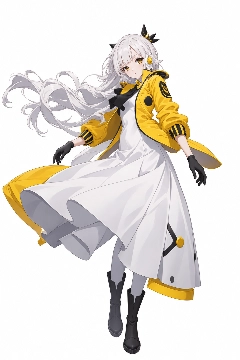
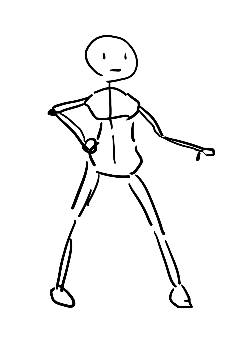
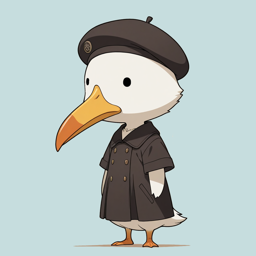
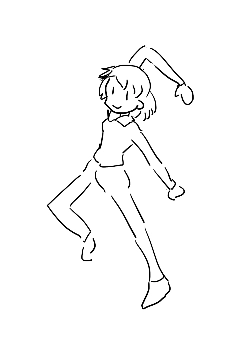
キャラクターの参照画像とポージングのスケッチ画像を用意します。

キャラクター
キャラクター - 参照画像のキャラクターにラフスケッチのポーズをとらせる - P-H3-Image の利用:画像1
ポーズのスケッチ
ポーズのスケッチ - 参照画像のキャラクターにラフスケッチのポーズをとらせる - P-H3-Image の利用:画像2


プロンプトは以下を利用します。

入力プロンプト
create an image of the customer in <Picture 1> striking the pose in <Picture 2>.


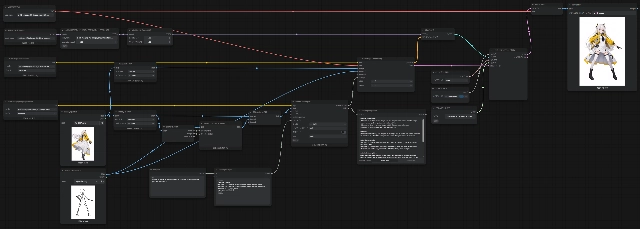
ワークフローは以下の設定とします。参照画像の1つ目にキャラクターの画像を設定し、2つ目の画像にポーズのスケッチを指定します。 ポーズのラフスケッチのほうが参照の参照画像にしたほうがよさそうな気もしますが、順番が逆になると、成功確率が下がります。

以下の書式が推奨されているため、主体側を partially_preserved にしてポーズを変えさせる方がモデルの得意なパターンに乗るようです。

retention_analysis:
<Picture 1> (composition anchor): partially_preserved - enclosure and lighting kept
<Picture 2> (reference): attribute_transfer - man's appearance and clothing
<Subject 1>: partially_preserved - pose adjusted to carry rider
<Subject 2>: attribute_transfer - seated on rhino's back


ワークフローは下図です。
参照画像のキャラクターにラフスケッチのポーズをとらせる - P-H3-Image の利用:画像3

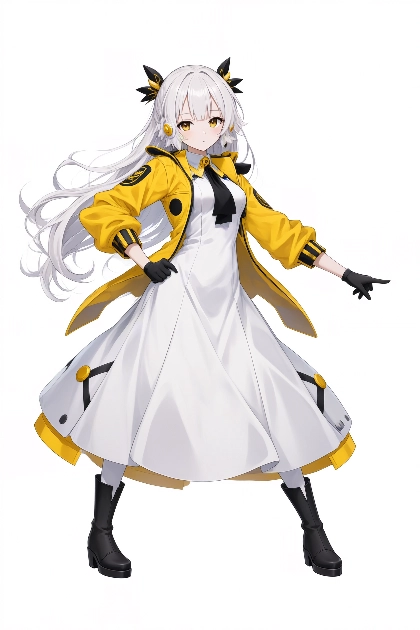
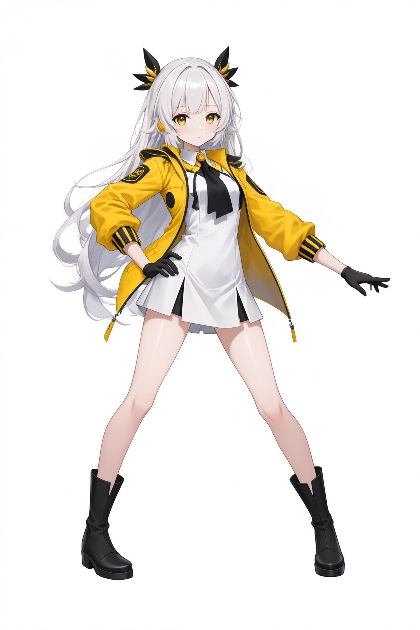
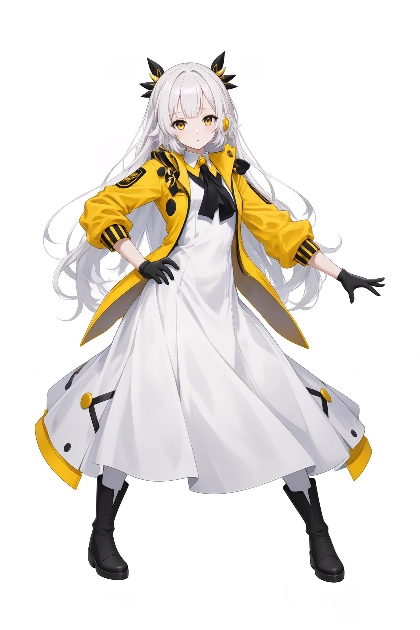
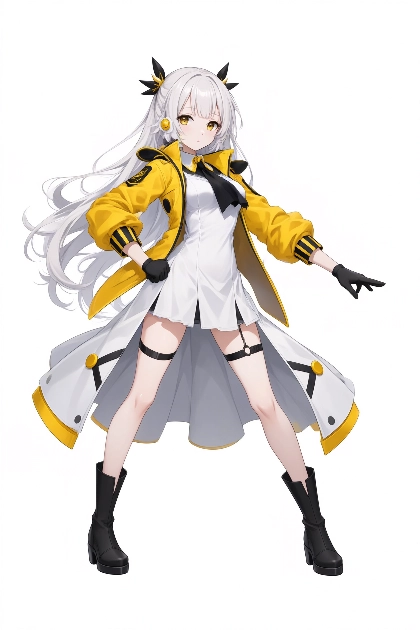
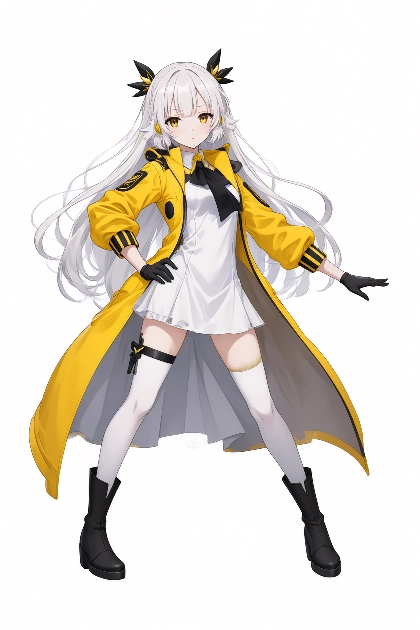
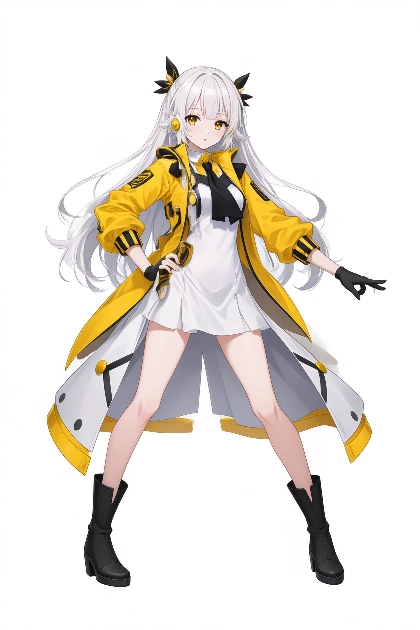
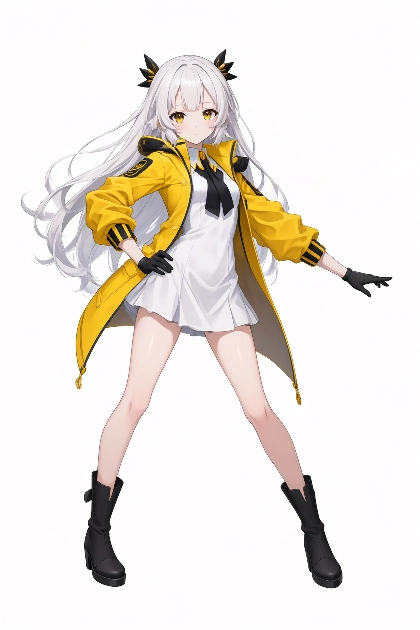
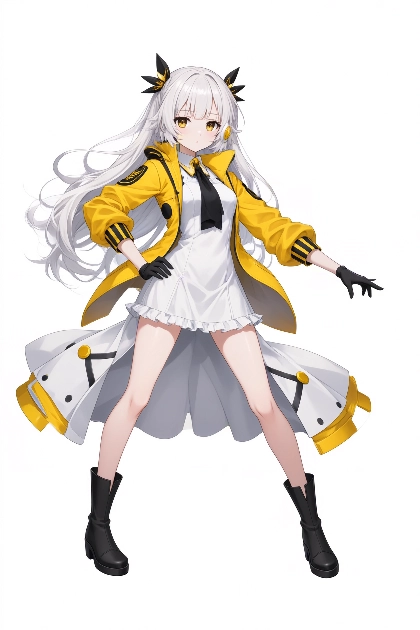
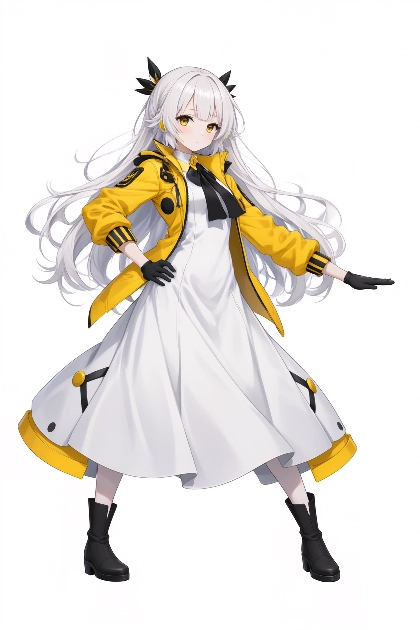
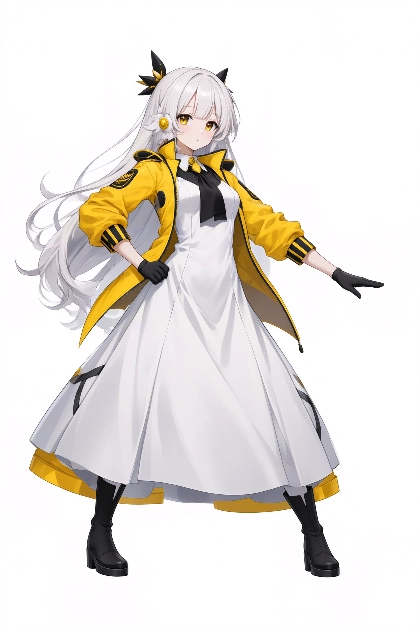
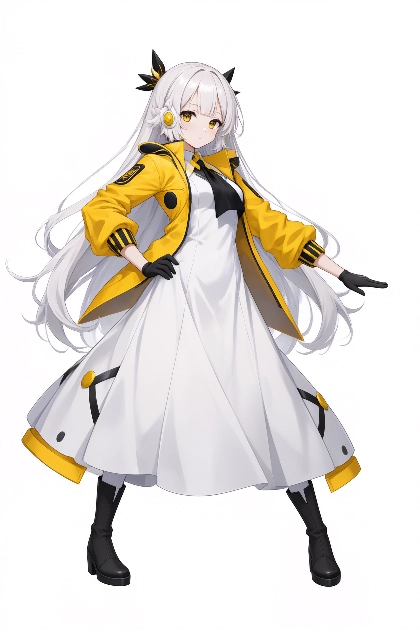
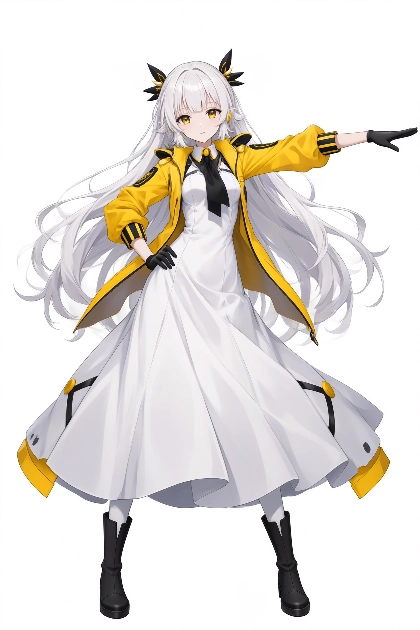
画像生成結果は下図です。スケッチのポーズにキャラクターのポーズが変わりました。スカートの長さは、生成シードごとの変化がかなり大きいです。

参照画像のキャラクターにラフスケッチのポーズをとらせる - P-H3-Image の利用:画像4
参照画像のキャラクターにラフスケッチのポーズをとらせる - P-H3-Image の利用:画像5
参照画像のキャラクターにラフスケッチのポーズをとらせる - P-H3-Image の利用:画像6
参照画像のキャラクターにラフスケッチのポーズをとらせる - P-H3-Image の利用:画像7
参照画像のキャラクターにラフスケッチのポーズをとらせる - P-H3-Image の利用:画像8
参照画像のキャラクターにラフスケッチのポーズをとらせる - P-H3-Image の利用:画像9
参照画像のキャラクターにラフスケッチのポーズをとらせる - P-H3-Image の利用:画像10
参照画像のキャラクターにラフスケッチのポーズをとらせる - P-H3-Image の利用:画像11
参考:アップサンプリングのプロンプト
subject_definitions:
<Picture 1> is the source image and the composition anchor of the target frame: anime girl in yellow and white outfit.
<Picture 2> is a reference image: stick figure pose reference.
<Subject 1> is the anime girl in <Picture 1>.

summary:
[keyframe completion] The target is a single still frame, an edited version of <Picture 1>, in which <Subject 1> adopts the pose from <Picture 2>.

retention_analysis:
<Picture 1> (composition anchor): partially_preserved - character design and colors kept
<Picture 2> (reference): attribute_transfer - pose and body orientation
<Subject 1>: partially_preserved - identity kept, pose changed

detailed_description:
Anime digital illustration style. [Shot 1] <Subject 1> stands centered against a plain white background, adopting the pose from <Picture 2>. Her legs are spread wide apart, her right hand rests on her hip, and her left arm extends straight out to the side. Her face, white hair, yellow jacket, white dress, and black boots from <Picture 1> remain unchanged. The camera is static and nothing moves; the frame holds this single still image.

overall_soundscape:
N/A

non_diegetic_music:
N/A
参考:アップサンプリングのプロンプト(日本語訳)
対象定義:
<Picture 1>は、ターゲットフレームの元画像であり、構図の基準となる画像です。黄色と白の衣装を着たアニメ少女です。
<Picture 2> は、参考画像です。棒人間ポーズの参考画像です。
<被写体1>は、<画像1>のアニメ少女です。

概要:
【キーフレーム完成】ターゲットは、<画像1>を編集した静止画1枚です。<被写体1>は、<画像2>のポーズをとっています。

保持分析:
<Picture 1>(構図基準):部分的に保持 - キャラクターデザインと色を保持
<Picture 2> (参考):属性の移転 - ポーズと体の向き
<Subject 1>: 部分的に保持 - アイデンティティを保持、ポーズを変更

詳細説明:
アニメ風デジタルイラストスタイル。 【ショット1】<Subject 1>は、<Picture 2> と同じポーズで、無地の白い背景の中央に立っている。 両足を大きく開き、右手を腰に当て、左腕をまっすぐ横に伸ばしている。<写真1>と同じ顔、白い髪、黄色のジャケット、白いドレス、黒いブーツはそのまま。 カメラは固定されており、何も動かない。画面にはこの一枚の静止画が収まっている。
全体的なサウンドスケープ:
N/A

非劇中音楽:
N/A

アップサンプリングを利用しない場合

アップサンプリングを利用せず、直接プロンプトを記述する場合の結果です。
以下のプロンプトで画像生成します。

プロンプト
subject_definitions:
<Picture 1> is the source image and composition anchor: an anime girl with long white hair, yellow eyes, black hair accessories, yellow jacket, white dress, black boots.
<Picture 2> is a reference image: a stick figure showing a target pose.
<Subject 1> is the girl in <Picture 1>.

summary:
<Subject 1> changes her pose to match the stick figure in <Picture 2>, keeping her full character design.

retention_analysis:
<Picture 1> (composition anchor): partially_preserved - character design, outfit, art style and colors kept
<Picture 2> (reference): attribute_transfer - body pose only; the stick figure itself is not drawn
<Subject 1>: partially_preserved - pose changed to match <Picture 2>

detailed_description:
Anime illustration style, full-body shot, centered on a plain white background. <Subject 1> stands facing the viewer with her feet planted about twice shoulder-width apart, weight evenly balanced. Her right hand rests on her right hip with the elbow pointing outward. Her left arm is extended straight out to her left side at shoulder height, palm facing down, fingers together. Her torso is upright and her head is turned slightly toward her extended hand. She keeps her long white hair, yellow eyes, black hair accessories, yellow jacket, white dress and black boots exactly as in <Picture 1>. No lines, sticks or skeleton marks appear in the image.
プロンプト(日本語訳)
対象定義:
<Picture 1>は、元となる画像であり、構図の基準となる画像です。長い白髪、黄色の瞳、黒いヘアアクセサリー、黄色のジャケット、白いドレス、黒いブーツを身に着けたアニメ風の少女が描かれています。

<Picture 2>は、参考画像です。目標とするポーズを示す棒人間が描かれています。

<Subject 1>は、<Picture 1>の少女です。

概要:
<Subject 1>は、<Picture 2>の棒人間に合わせてポーズを変更し、キャラクターデザインはそのまま維持しています。

保持分析:
<Picture 1>(構図の基準):部分的に保持 - キャラクターデザイン、衣装、画風、色彩が保持されています。
<Picture 2>(参考):属性の移転 - ポーズのみが変更されています。棒人間自体は描かれていません。
<Subject 1>:部分的に保持 - <Picture 2>に合わせてポーズが変更されています。

詳細説明:
アニメ風イラスト、全身ショット、白い背景の中央に配置されています。 <Subject 1>は、両足を肩幅の約2倍ほど開いて、体重を均等に分散させ、鑑賞者の方を向いて立っている。右手は右腰に置き、肘は外側を向いている。左腕は肩の高さで左側にまっすぐ伸ばし、手のひらは下向きで、指は揃えている。胴体はまっすぐで、頭は伸ばした手の方に少し向いている。長い白い髪、黄色い目、黒いヘアアクセサリー、黄色いジャケット、白いドレス、黒いブーツは、<Picture 1>と全く同じである。画像には線、棒、骨格の痕跡は一切見られない。


ワークフローは下図です。
参照画像のキャラクターにラフスケッチのポーズをとらせる - P-H3-Image の利用:画像12

画像生成結果は下図です。こちらの結果では、スカートの長さがロングスカートで固定される結果になりました。

参照画像のキャラクターにラフスケッチのポーズをとらせる - P-H3-Image の利用:画像13
参照画像のキャラクターにラフスケッチのポーズをとらせる - P-H3-Image の利用:画像14
参照画像のキャラクターにラフスケッチのポーズをとらせる - P-H3-Image の利用:画像15
参照画像のキャラクターにラフスケッチのポーズをとらせる - P-H3-Image の利用:画像16
トリーニョ
コメント
参照画像のスケッチではなくて、スケッチのポーズのを言葉で表現しているプロンプト文言のほうが、生成結果に強い影響がありそうな気も?

キャラクターシートを利用する場合

カモロー
質問: キャラクターシートの場合はどうする?
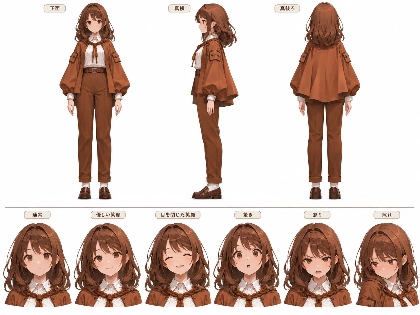
参照画像がキャラクターシートなのですが、この場合はどうするのが良いですか?


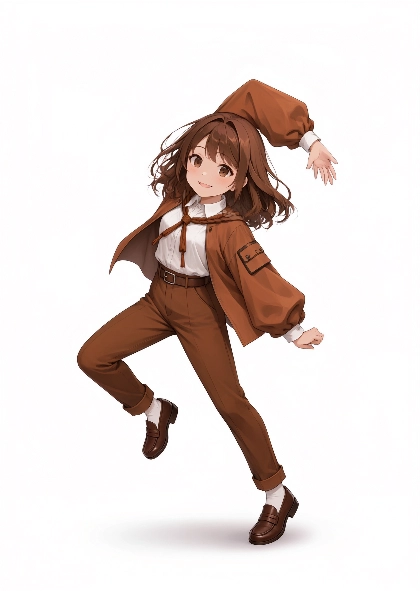
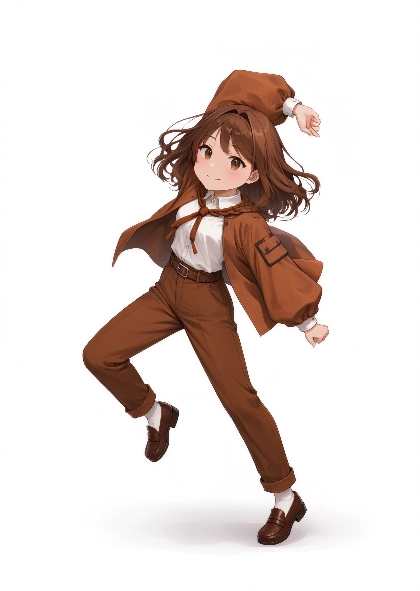
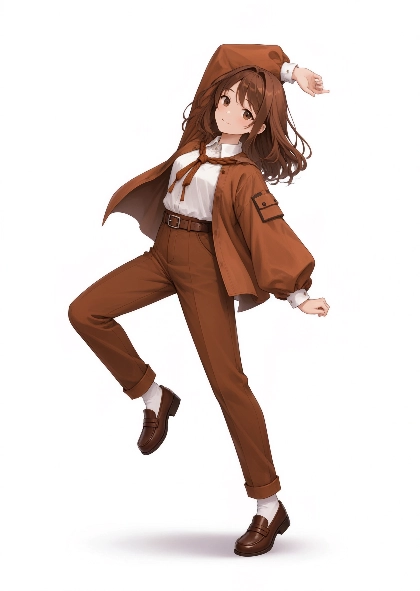
参照画像がキャラクターシートの場合は、一枚目の画像をポーズのスケッチの画像にしたほうが良いです。

ポーズスケッチ
ポーズスケッチ - 参照画像のキャラクターにラフスケッチのポーズをとらせる - P-H3-Image の利用:画像17
キャラクターシート
キャラクターシート - 参照画像のキャラクターにラフスケッチのポーズをとらせる - P-H3-Image の利用:画像18


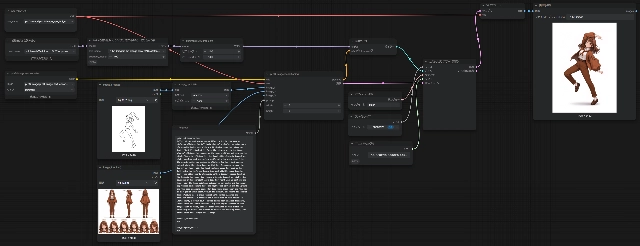
ワークフローは下図です。今回はupsamplingは利用せず、1枚目にポーズのスケッチ、2枚目にキャラクターシートを設定しています。
参照画像のキャラクターにラフスケッチのポーズをとらせる - P-H3-Image の利用:画像19


プロンプトは以下を利用します。このプロンプトはupsamplingではなく、LLM(claude)に参照画像を渡して作成したプロンプトです。

プロンプト
subject_definitions:
<Picture 1> is the source image and composition anchor: a rough stick-figure sketch showing a cheerful dancing pose on a white background.
<Picture 2> is a reference image: the character sheet of an anime girl, with front, side and back views and facial expressions.
<Subject 1> is the girl from <Picture 2>.

summary:
The stick figure in <Picture 1> is replaced by <Subject 1>, fully rendered in the same pose, with a gentle smile.

retention_analysis:
<Picture 1> (composition anchor): partially_preserved - pose, head tilt, figure placement, framing and white background kept; the sketch lines and stick figure are fully replaced and not drawn
<Picture 2> (reference): attribute_transfer - character design, front-view face, hair, outfit, art style, colors and the gentle smile expression; the sheet layout, text labels and extra figures are not drawn
<Subject 1>: attribute_transfer - appearance from <Picture 2>, pose from <Picture 1>

detailed_description:
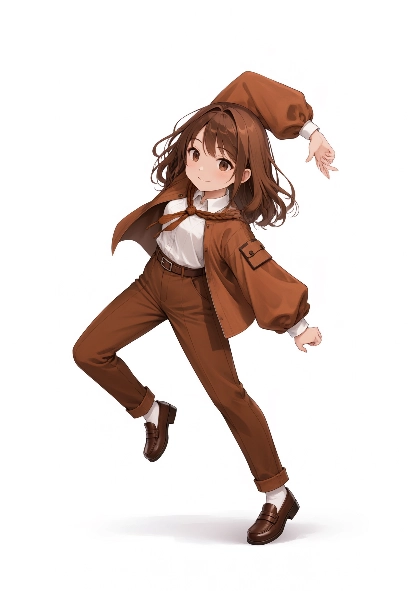
Fully colored and shaded anime illustration in the same art style as <Picture 2>, full-body shot of a single character on a plain white background with a soft shadow under her standing foot. [Shot 1] <Subject 1> faces the viewer, as in the front view of <Picture 2>, occupying the same position and pose as the stick figure in <Picture 1>. Her head tilts slightly toward her right shoulder and she smiles gently with her eyes open, like the gentle smile expression in <Picture 2>. Her right arm is raised high, the elbow bent so that her forearm arcs over the top of her head, with her hand resting above her head on her left side. Her left arm hangs down and slightly away from her body, the elbow nearly straight, with a loosely closed hand at hip height. Her upper body leans a little toward her right. She balances on her straight left leg. Her right leg is bent at the knee, with the knee pointing outward to her right and her lower leg tucked back behind her, the right foot lifted off the ground and the toes pointing down. Her long wavy brown hair and the hem of her jacket sway lightly with the motion. She wears the outfit from <Picture 2>: a brown jacket with puffed sleeves and shoulder pockets, a braided brown cord tied at the collar, a white shirt, a brown belt, cuffed brown high-waisted trousers, white socks and brown loafers. Only one figure appears in the image, with no text, labels, black outlines of the sketch or stick-figure marks. The camera is static and nothing moves; the frame holds this single still image.

overall_soundscape:
N/A

non_diegetic_music:
N/A
プロンプト(日本語訳)
subject_definitions:
<Picture 1> はソース画像であり構図の基準(composition anchor):白背景に描かれた、楽しげに踊るポーズのラフな棒人間スケッチ。
<Picture 2> は参照画像:正面・側面・背面の全身図と表情差分を含む、アニメ調の少女のキャラクターシート。
<Subject 1> は <Picture 2> の少女。

summary:
<Picture 1> の棒人間を <Subject 1> に置き換え、同じポーズのまま完全に描き込み、穏やかな笑顔にする。

retention_analysis:
<Picture 1> (composition anchor): partially_preserved - ポーズ、頭の傾き、人物の配置、画面構成、白背景を維持する。スケッチの線と棒人間は完全に置き換え、描画しない
<Picture 2> (reference): attribute_transfer - キャラクターデザイン、正面から見た顔、髪、衣装、画風、配色、穏やかな笑顔の表情を反映する。シートのレイアウト、文字ラベル、他の人物は描画しない
<Subject 1>: attribute_transfer - 外見は <Picture 2> から、ポーズは <Picture 1> から

detailed_description:
<Picture 2> と同じ画風で、完全に着彩・陰影付けされたアニメイラスト。無地の白背景に、キャラクター1人の全身を描いたショットで、軸足の下に柔らかい影が落ちている。[Shot 1] <Subject 1> は <Picture 2> の正面図のように見る人の方を向き、<Picture 1> の棒人間と同じ位置・同じポーズをとっている。頭はわずかに右肩の方へ傾き、<Picture 2> の「優しい笑顔」の表情のように、目を開けて穏やかに微笑んでいる。右腕は高く上げ、肘を曲げて前腕が頭頂の上を弧を描くように通り、手は頭上の左側に添えられている。左腕は体から少し離して下ろし、肘はほぼまっすぐで、腰の高さで手を軽く握っている。上半身はやや右へ傾いている。まっすぐ伸ばした左脚で体を支えている。右脚は膝を曲げ、膝を右外側へ向け、下腿を後ろへたたみ込み、右足を地面から浮かせてつま先を下に向けている。長いウェーブのかかった茶色の髪とジャケットの裾が、動きに合わせて軽く揺れている。衣装は <Picture 2> のもので、パフスリーブと肩ポケットの付いた茶色のジャケット、襟元で結んだ茶色の編み紐、白いシャツ、茶色のベルト、裾を折り返した茶色のハイウエストパンツ、白い靴下、茶色のローファーを身に着けている。画像に登場するのは1人だけで、文字、ラベル、スケッチの黒い輪郭線、棒人間の痕跡は一切ない。カメラは固定されており、何も動かない。画面はこの1枚の静止画を保持する。

overall_soundscape:
N/A

non_diegetic_music:
N/A


画像生成結果は下図です。スケッチのポーズのキャラクターが生成できました。

参照画像のキャラクターにラフスケッチのポーズをとらせる - P-H3-Image の利用:画像20
参照画像のキャラクターにラフスケッチのポーズをとらせる - P-H3-Image の利用:画像21
参照画像のキャラクターにラフスケッチのポーズをとらせる - P-H3-Image の利用:画像22
参照画像のキャラクターにラフスケッチのポーズをとらせる - P-H3-Image の利用:画像23
AuthorPortraitAlt
著者
iPentecのメインデザイナー
イタリア好き。Webページ、Webクリエイティブのデザインを担当。PhotoshopやIllustratorの作業もする。 最近は生成AIの画像生成の沼に沈んでいる。
作成日: 2026-11-08