LTX-2.5 のインストール - ComfyUI を利用
LTX-2.5をComfyUIに導入する手順を紹介します。
LTX-2.5の導入
LTX-2.5をComfyUIで利用できるようにします。
事前準備: ComfyUIの更新
ComfyUIを最新バージョンに更新します。手順はこちらの記事を参照してください。
ComfyUIがインストールされていない場合はこちらの記事を参照して、ComfyUIをインストールします。
モデルのダウンロード
LTX-2.5
以下のページから "ltx-2.5-22b-distilled-transformer-comfy-int8-convrot.safetensors" (21.5GB)をダウンロードします。
ダウンロードしたファイルを以下のディレクトリに配置します。
(ComfyUIの配置ディレクトリ)\ComfyUI\models\diffusion_models\ltx-2.5
テキストエンコーダー
以下のページから "gemma4-12b-with-proj-ltx-2.5-comfy-int8-convrot.safetensors" (15.4GB) をダウンロードします。
ダウンロードしたファイルを以下のディレクトリに配置します。
(ComfyUIの配置ディレクトリ)\ComfyUI\models\text_encoders\ltx-2.5
プロンプトエンハンサー用のLLM
以下のページから "gemma4_e2b_it_bf16.safetensors" (15.4GB) をダウンロードします。
ダウンロードしたファイルを以下のディレクトリに配置します。
(ComfyUIの配置ディレクトリ)\ComfyUI\models\text_encoders\ltx-2.5
VAE
以下のページから "ltx-2.5-audio-vae-bf16.safetensors" と "ltx-2.5-video-vae-bf16.safetensors" をダウンロードします。
音声とビデオそれぞれのVAEが必要です。
ダウンロードしたファイルを以下のディレクトリに配置します。
(ComfyUIの配置ディレクトリ)\ComfyUI\models\vae\ltx-2.5
アップスケーラー
中間処理でLatentをアップスケールするためのモデルです。
以下のページから "gemma4_e2b_it_bf16.safetensors" (15.4GB) をダウンロードします。
ダウンロードしたファイルを以下のディレクトリに配置します。
(ComfyUIの配置ディレクトリ)\ComfyUI\models\latent_upscale_models\ltx-2.5
ワークフロー
ワークフローはこちらからダウンロードできます。
Text to Video (T2V)
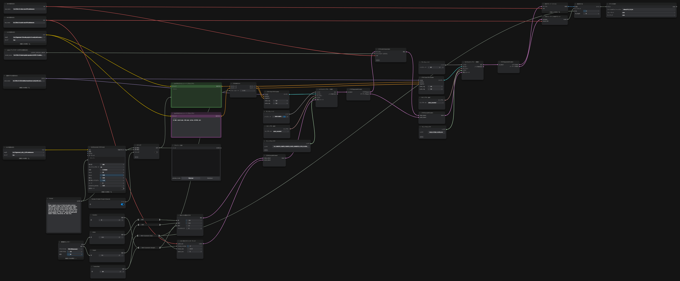
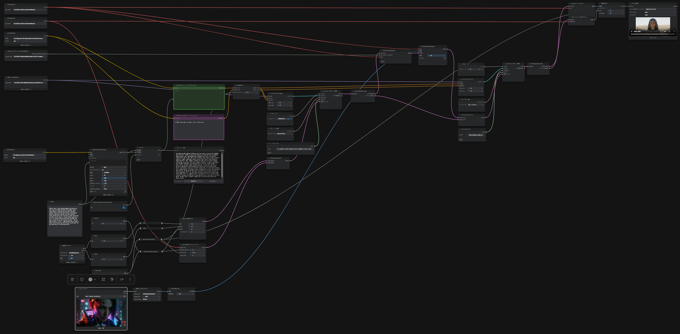
今回は整理した以下のワークフローを利用します。プロンプトエンハンサーがあるため、ノードが多く見えます。
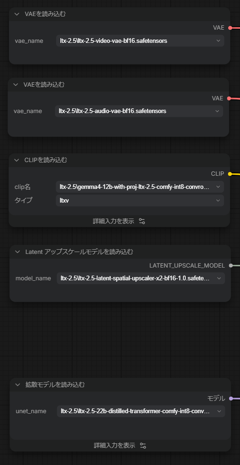
モデルの読み込みノードでは、ダウンロードして配置した各モデルを参照します。
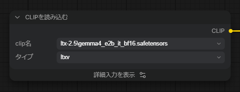
プロンプトはサンプルの以下で生成します。テキストエンハンサーのスイッチはONにします。
プロンプト
Dynamic cinematic close-up of high-tech modular machinery self-assembling in midair, precision robotic parts, magnetic connectors, and glowing circuits clicking together, subtle smoke and light flares, extremely detailed titanium textures. The final product displays a clean, clear surface with large glowing engraved text “LTX-2.5” centered and unobstructed, dramatic lighting, photorealism, 8K, sharp focus.
[実行する]ボタンをクリックして処理を開始します。
[ビデオを保存]ノードに生成した動画が表示されれば処理完了です。
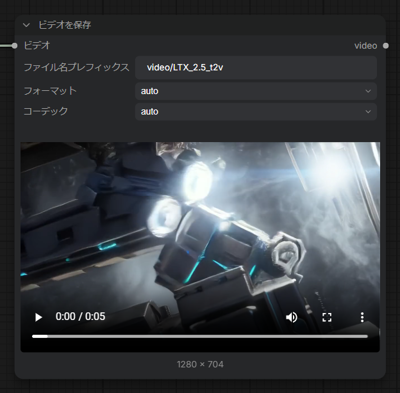
Image to Video (I2V)
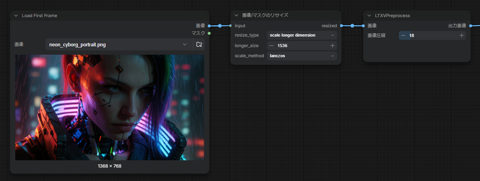
画像を参照して動画を生成するワークフローです。
t2vのワークフローに画像の読み込みノードと、画像のリサイズ、LTX Preprocess のノードが追加されています。
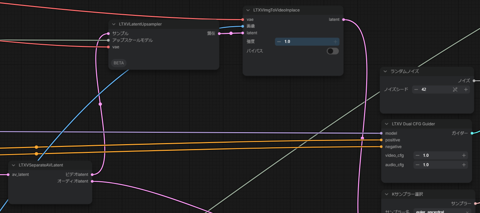
LTXVLatentUpsamplerの後ろにLTXVImgToVideoInplaceノードが追加されており、LTXVLatentUpsamplerのLatentの出力が、LTXVImgToVideoInplaceのLatent入力につながっています。
また、参照画像はLTXVLatentUpsamplerの画像に接続されて入力されます。
プロンプトはサンプルの以下を利用します。テキストエンハンサーのスイッチはONにします。
プロンプト
Egyptian royal in blue-and-gold headdress and high collar, white dress with golden embroidery and armbands, desert, robot soldiers in formation left and right. She walks steadily forward, head held level and gaze fixed ahead—no dipping or lowering of the head. The camera performs a single, smooth push-in only: starting in a wider shot of her, the robots, and the desert, it moves steadily forward until she is in a medium or medium-close frame, then holds. She stops, posture and head still upright, and says: “The old gods are silent. I am not.” Robot soldiers shift or march in place; sand and fabric move with the wind. No pull-back; the only camera move is the continuous push-in.
FLF2V
最初のフレームと、最後のフレームの画像を入力して画像を生成する方式です。
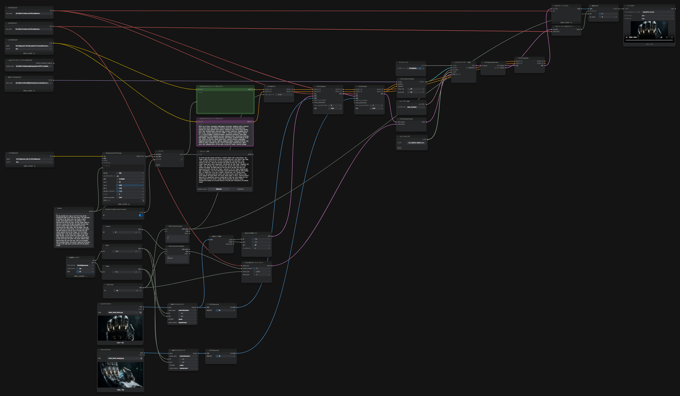
画像の参照ノードは2つ配置します。[画像/マスクのリサイズ]を経由して、[LTXVPreprocess]ノードに接続します。
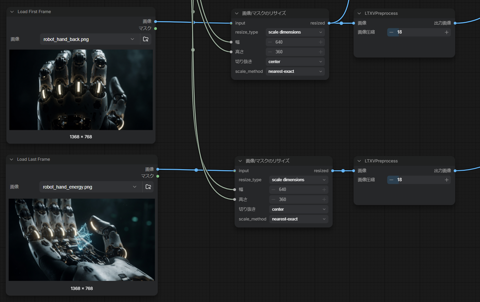
開始フレームの参照画像のほうは[画像サイズ取得]ノードで画像のサイズを取得し、[空のLTXV潜在ビデオ]を開始フレームのサイズで作成します。
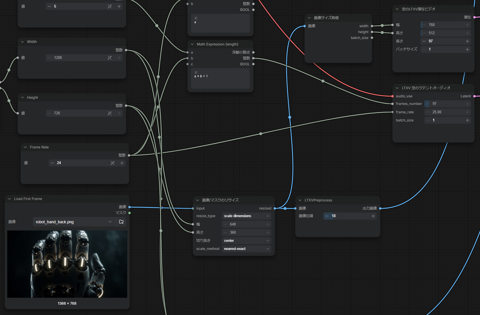
参照画像の[LTXVPreprocess]ノード取得は[LTXVAddGuide]に入力します。LTXVAddGuideノードは2つあり、最初のノードに開始フレームの画像、
2つ目のノードに終了フレームの画像を入力します。2つ目のLTXVAddGuideの[フレームインデックス]の値は"-1"にします。
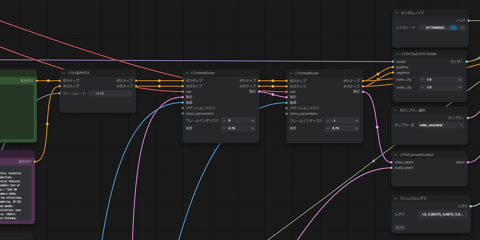
[LTXVCropGuides]のノードを追加して、LTXVAddGuideの出力を入力します。
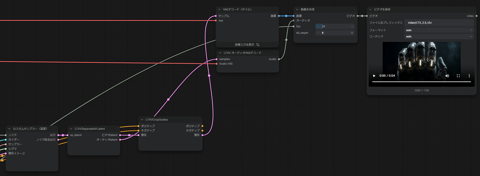
プロンプトはサンプルの以下を利用します。テキストエンハンサーのスイッチはONにします。
プロンプト
Use the provided start image as the first frame and the provided end image as the final frame anchor. The video opens on the back of the robotic hand, four fingers slightly curled, joints glowing faintly in the darkness, a low electrical hum filling the space. The hand rotates slowly at the wrist, turning from the back view toward the palm side, the four visible fingers uncurling gently one by one, starting with the index finger, then the middle, ring, and pinky, each joint clicking softly. As the palm turns upward, the thumb swings out from the side of the hand into view, clearly separate from the four fingers, all five fingers spreading open. A blue energy crystal fades into existence above the palm, its hum rising into a resonant tone, thin energy threads coiling around it, particles crackling softly as they spiral away like sparks. The crystal rotates slowly, hovering above the fully open hand, light spilling between the five spread fingers, the crystal's steady hum filling the silence as the video ends on the open palm with the glowing crystal.
著者
iPentecのメインデザイナー
イタリア好き。Webページ、Webクリエイティブのデザインを担当。PhotoshopやIllustratorの作業もする。
最近は生成AIの画像生成の沼に沈んでいる。